A Nice List certificate, with your child’s name
Updated · Free · No sign-up · Nothing uploaded
Type their name and what it is for. The certificate is drawn in your browser, signed by Santa with his North Pole seal: one page each, A4 or US Letter, free to print.
How to
- Type the name. Type your child’s first name. For siblings or a class, put each name on its own line: every child gets a certificate of their own.
- Say what it is for. Finish the line “for…”, or tap one of the ideas. Leave it empty and the certificate says something kind instead.
- Pick who signs, and the paper. Santa Claus or Father Christmas, then A4 or US Letter.
- Download or print. Download the PDF or print it straight away. Print at “Actual size” for the best fit.
What you get
A one-page PDF on A4 or US Letter for each child: “Nice List · Certificate”, the child’s name in large letters, what it is for, Santa’s signature and a North Pole seal. Black on white, made to print at home.
What the certificate says
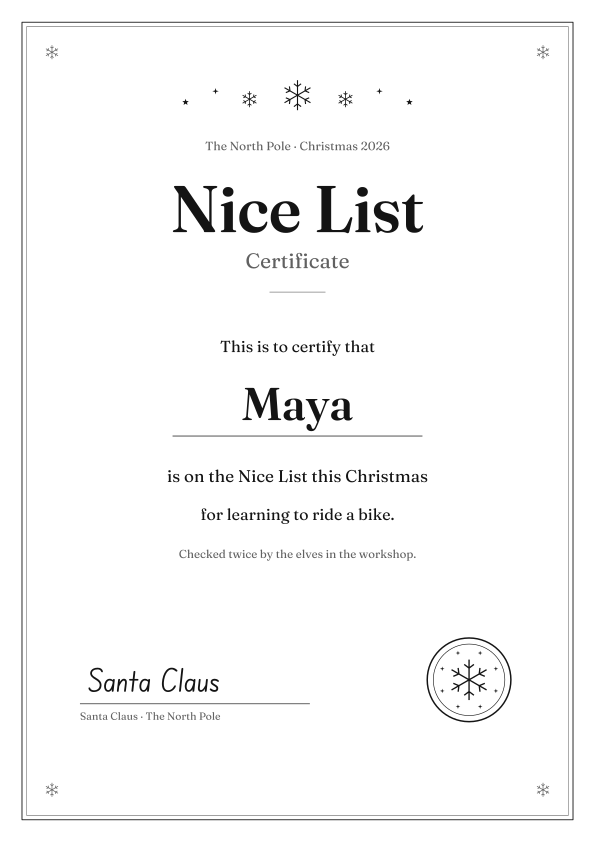
Here is the certificate for Maya, who learned to ride a bike. Your words replace hers.
Nice List · Certificate
The North Pole · Christmas 2026
This is to certify that Maya is on the Nice List this Christmas for learning to ride a bike.
Checked twice by the elves in the workshop.
Santa Claus · The North Pole
To go with it: a letter from Santa, with the same name.
For a class or a party
Paste the names from your list, one per line (up to 30), and download one PDF: a certificate per child, in the order you typed them, bookmarked by name. The list stays in your browser, so there is nothing to delete afterwards.
Three ways to give it
- Rolled up with a ribbon, beside the letter from Santa.
- On the breakfast table on the first of December.
- Handed out on the last day of term, one for every child in the class.
For Christmas Eve: a personalized Christmas storybook, with your child as the star.
Questions
Is it free?
Yes. The certificate and its PDF are free, with no sign-up.
Does what I type leave my device?
No. The certificate is drawn in your browser. The names and what you type are never sent to us and are not saved.
Can each of my children have their own?
Yes. Put each name on its own line, up to 30. Every child gets a page of their own, in one PDF.
Can I print a set for my class?
Yes. Paste the class list, one name per line. The PDF has a certificate for each child, in the order you typed them. The list stays in your browser.
Can I print it without a name?
Yes. Leave the name empty and the certificate prints with a line to write the name by hand.
Will my child see a website name on it?
No. The page carries the certificate, a border, snowflakes, the signature and a North Pole seal. There is no web address and no logo on it.
Santa Claus or Father Christmas?
Either. The choice changes the signature and the line under it.
A4 or Letter?
Both. Each certificate is one page either way. Print at “Actual size”; thicker paper makes it feel special.
Is there a letter to go with it?
Yes. The letter from Santa is another free page here. It takes the same name, one good thing and a wish.
Names stay on this device: the page is drawn in your browser and nothing is uploaded.
Explore storybooks: free illustrated storybooks in your family's language.
Enable JavaScript to make your own.